71-Key Wireless Hot-Swap Keyboard for Clean Gaming
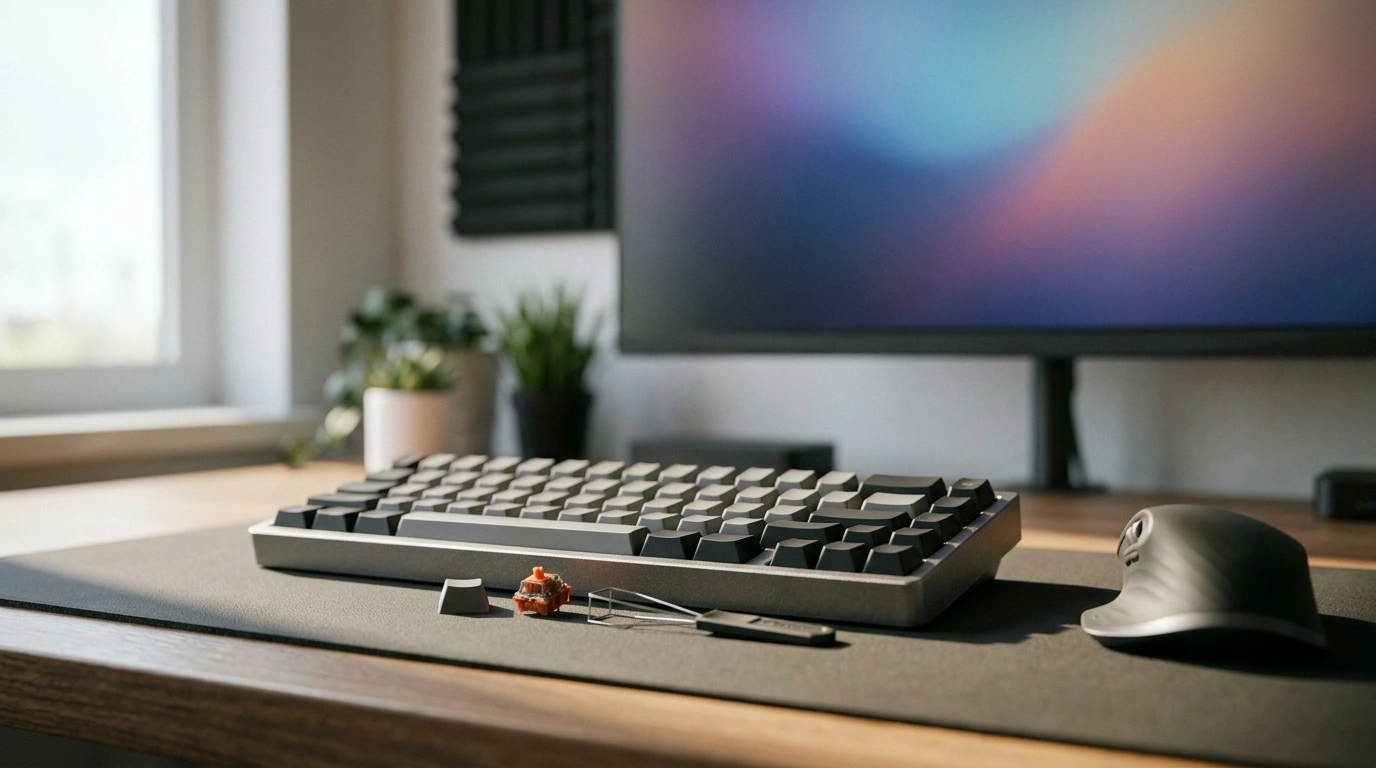
Hot Swap 71-Key Wireless Mechanical Gaming Keyboard: a clean setup with the freedom to tune every key
A gaming keyboard should feel fast, stay comfortable during long sessions, and fit the way your desk is actually used. Our Hot Swap 71-Key Wireless Mechanical Gaming Keyboard is built for that everyday reality: a compact layout that keeps mouse space open, wireless convenience to cut cable clutter, and hot-swappable switch support so your typing feel can evolve over time without replacing the whole board. Below, our team breaks down where a 71-key format shines, how hot swap changes ownership, and what to adjust first so your keyboard feels dialed-in from day one.
Why a 71-key layout works for gaming and everyday work
A smaller keyboard is often the simplest upgrade for your posture and your aim—because it changes how your whole setup fits together.
- More room where it matters: A compact footprint leaves extra space for lower-sensitivity mouse movement and cleaner desk layouts.
- Still practical beyond games: A 71-key style layout keeps core keys close, reducing hand travel for common shortcuts and navigation.
- Easier to position correctly: Smaller boards make it simpler to keep shoulders relaxed and wrists straighter—especially on narrower desks.
- Great for mixed setups: Compact boards travel well for LAN nights, dorm desks, and hybrid home/office workstations.
Quick layout fit check
| If the setup looks like this… | A 71-key board helps because… |
|---|---|
| Low-sensitivity FPS aiming or wide mouse sweeps | Frees space on the right side so the mouse isn’t crowded |
| Small desk, laptop stand, or monitor arm setup | Keeps the keyboard centered without pushing the mouse off the edge |
| Alternating between gaming and typing | Compact reach supports quick key access without feeling cramped |
| Traveling between rooms or workspaces | Smaller footprint is easier to pack and reposition |
Hot swap: the easiest way to customize feel without replacing the keyboard
The switch feel is the “engine” of a mechanical keyboard. Hot swap makes changing that feel approachable and reversible, which is a big deal if you’re still figuring out what you like or you want one board to adapt to different phases (late-night quiet gaming, office work, competitive sessions, and everything between).
- An upgrade path that makes sense: Try different switch styles over time—lighter for speed, heavier for control, quieter for shared spaces—while keeping the same board.
- Simple maintenance: If one key starts misbehaving, you can replace that single switch without soldering.
- Tuning without drama: You can match switches to roles (for example, slightly heavier on spacebar/modifiers) when you want a more deliberate feel.
If you’re the kind of player who wants to experiment even further with actuation behavior, it may also be worth comparing to a Hall effect option like our Rapid Trigger Magnetic 65% Gaming Keyboard with RGB and Hall Effect Switches, which is built around a different switch technology and tuning approach.
Wireless convenience without giving up responsiveness habits
Wireless doesn’t just remove a cable—it changes how quickly you can reset your space between work and play. With fewer wires to route around microphones, mixers, USB hubs, or charging docks, your desk stays easier to manage, and you can place the keyboard where your arms naturally want it.
- Cleaner desk, faster transitions: Fewer cables makes it easier to move from typing to gaming without re-routing your setup.
- More placement freedom: You can angle and center the keyboard for posture instead of “where the cable reaches.”
- A simple routine beats surprises: Top up battery during breaks so longer sessions don’t get interrupted.
- Signal consistency matters: Keep the receiver/host area clear when possible to reduce interference from clutter and dense setups.
For a helpful baseline understanding of wireless standards and device behavior, you can reference the Bluetooth SIG overview at bluetooth.com. For general USB ecosystem and best practices around ports and devices, the USB Implementers Forum at usb.org is a solid resource.
First-day tuning: make it feel right in 15 minutes
Fast, high-impact adjustments
| Adjustment | Time | Payoff |
|---|---|---|
| Positioning and angle | 2 minutes | Immediate comfort improvement |
| Key repeat rate in OS | 3 minutes | Cleaner typing and consistent holds |
| Spacebar/modifier feel check | 5 minutes | Better everyday satisfaction |
| Test in a practice range | 5 minutes | Confidence before ranked play |
Who this keyboard fits best (and who should choose differently)
- Best fit: You want a compact board, a clean wireless setup, and the option to tune switch feel over time. That’s exactly where our Hot Swap 71-Key Wireless Mechanical Gaming Keyboard shines.
- Great for multi-use desks: If you bounce between gaming, writing, spreadsheets, and chat, the smaller footprint and switch flexibility make daily use smoother.
- Choose differently if: A dedicated number pad is non-negotiable for data entry, or you’re prioritizing rapid-trigger style inputs over classic mechanical switch feel.
- If rapid-trigger control is the goal: Compare against a Hall effect option designed around that style of tuning, like our Rapid Trigger Magnetic 65% Gaming Keyboard with RGB and Hall Effect Switches.
FAQ
What does “hot swap” mean on a mechanical keyboard?
Hot swap means you can remove and replace switches without soldering. For you, that translates to easy experimentation with different switch types and straightforward fixes if a single key starts acting up.
Is a 71-key keyboard too small for everyday typing?
For most people, it covers core typing and common shortcuts while reducing finger travel and desk reach. If you rely heavily on a number pad for data entry, a full-size keyboard may fit your workflow better, but many users adjust to a 71-key layout quickly.
How can wireless performance stay reliable for gaming?
Keep the receiver/host area unobstructed, avoid overly crowded USB setups when possible, and build a simple charging routine so battery levels don’t dip mid-session. Before ranked play, do a quick in-game check to confirm everything feels consistent.












Leave a comment